
5 Signs You Need a CRM: Has Your Business Outgrown Spreadsheets?
Missed follow-ups, scattered data, and no clear view of your pipeline are signs your spreadsheet has reached its limit. Here is how to know when it is time for a CRM.
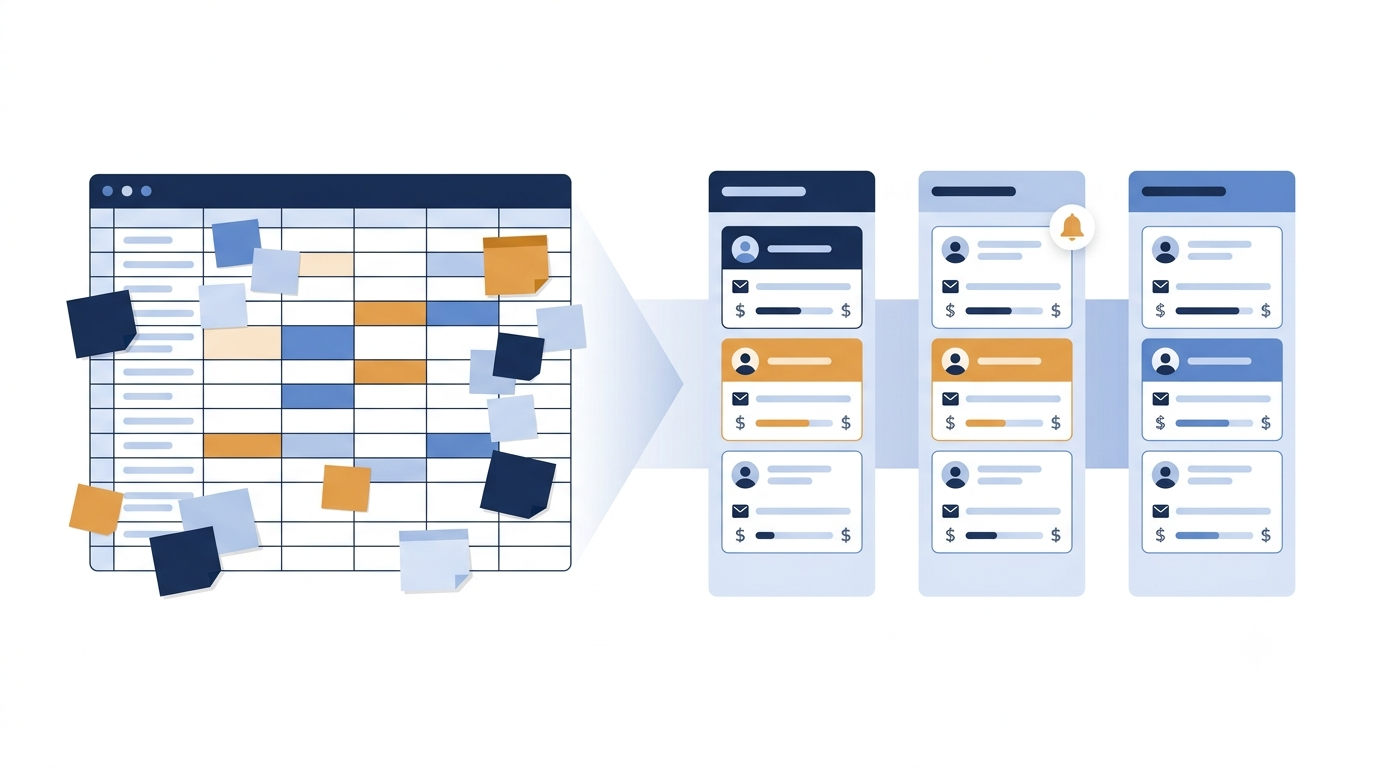
Knowing the signs you need a CRM can save a growing business from losing leads, time, and revenue without ever realising it. Every business begins with a spreadsheet. It is free, familiar, and flexible enough to hold almost anything: a list of prospects, a record of orders, a log of calls made last week. In the early days, when you are handling a handful of customers and every conversation is fresh in your memory, a spreadsheet does the job well.
But businesses grow, and the tools that served them at the start do not always grow with them. What was once a convenient system quietly becomes a bottleneck. Leads slip through the cracks, follow-ups are forgotten, and no one can say with confidence how many deals are actually in progress. The spreadsheet has not failed overnight. It has simply been asked to do something it was never designed to do.
This article describes five clear signs that your business has outgrown its spreadsheets and is ready for a Customer Relationship Management (CRM) system. If you recognise even two or three of them, it is likely that the cost of staying with your current approach already exceeds the cost of changing it.
Why Spreadsheets Work, Until They Don't
Before examining the warning signs, it is worth acknowledging why spreadsheets are so widely used. They deserve credit.
A spreadsheet requires no training, no subscription, and no setup. Anyone can open a file, type in a name and a phone number, and begin tracking. For a freelancer, a new shop, or a two-person team, this simplicity is a genuine advantage. There is little point in adopting complex software when your entire customer base fits on a single screen.
The difficulty arises because a spreadsheet is, at its core, a static grid of data. It stores information, but it does not act on it. It cannot remind you that a prospect has not been contacted in five days. It cannot show you which stage of the sales process a customer has reached. It cannot tell you which team member spoke to a client last. All of that depends on human memory and discipline, and both become unreliable as volume increases.
A CRM, by contrast, is designed to manage relationships over time. It records every interaction, organises leads by stage, assigns responsibility, and prompts action when action is needed. The question is not whether a CRM is better than a spreadsheet in the abstract. The question is when your business reaches the point where the difference matters. The following five signs will help you answer that.
Sign 1: Leads Are Slipping Through the Cracks
The first and most costly sign is also the most common: leads are being lost, not because they decided against you, but because no one followed up.
What it looks like
A prospect enquires on Monday. Someone notes the details in the spreadsheet and plans to call back. By Wednesday, three new enquiries have arrived and the original one is buried further down the sheet. By the following week, no one remembers to return to it. The prospect, having received no response, has already spoken to a competitor.
This pattern repeats quietly across many businesses. It rarely appears as a dramatic failure. It shows up as a vague sense that the business should be closing more deals than it is, without a clear explanation of where the opportunities went.
Why it happens
Spreadsheets are passive. They hold information but do not prompt anyone to act on it. Follow-ups depend entirely on an individual remembering to scroll through rows, spot the right entry, and take action. When the workload is light, this works. When the number of leads grows, it becomes nearly impossible.
Research on sales responsiveness has consistently shown that the speed of the first response and the consistency of follow-up have a major influence on conversion. A lead contacted promptly is far more likely to engage than one contacted days later. A business that relies on memory alone will inevitably miss some of these windows.
How a CRM addresses it
A CRM turns follow-up from a personal habit into a system. Every lead is assigned to a person. Every lead has a next step and a due date. When the date arrives, a reminder appears. If a follow-up is overdue, it is visible to the person responsible and to anyone who manages them.
This is the principle behind the reminder and task features in most CRMs, including the one we are building at LeadGo: each lead carries a next action, and the system, rather than anyone's memory, is responsible for surfacing it. The result is not simply convenience. It is accountability. No lead can be forgotten, because the system itself keeps track.
A quick self-check
Ask yourself: if a prospect enquired three weeks ago and was never contacted, would you know? If the honest answer is "probably not," this sign applies to you.
Sign 2: No One Has a Clear View of the Sales Pipeline
The second sign concerns visibility. Can you say, at any given moment, how many opportunities you have, what stage each one has reached, and how much revenue you can reasonably expect?
What it looks like
Ask a business owner how sales are going, and the answer is often based on instinct. "It has been a good month," or "things feel slow." When pressed for specifics, such as how many proposals are outstanding, how many prospects are close to a decision, or what the expected revenue is for next month, the answer requires an hour of manual counting, if it can be produced at all.
Some businesses attempt to solve this by adding more columns to their spreadsheet: a "status" column, a "stage" column, a "priority" column. Over time, the sheet becomes crowded, inconsistent, and difficult to read. Different team members use different labels. One person writes "Hot," another writes "Follow up," a third leaves the field blank.
Why it matters
Without a clear pipeline, planning becomes guesswork. You cannot forecast revenue, allocate effort sensibly, or identify where deals are stalling. If many prospects reach the proposal stage but few convert, that is a valuable insight, but only if you can see it. In a spreadsheet, such patterns remain hidden within hundreds of rows.
Visibility also affects decision-making. Should you hire another salesperson? Increase advertising spend? Adjust your pricing? Each of these decisions depends on understanding how leads move through your process, and where they leave it.
How a CRM addresses it
A CRM provides a visual pipeline, typically a board or a funnel, where each opportunity sits at a defined stage: new enquiry, contacted, demo scheduled, proposal sent, won, or lost. At a glance, you can see how many deals are at each stage and what they are worth.
Because the stages are standardised, everyone on the team uses the same language. Reports that once took hours to prepare are available instantly, and they reflect current data rather than last week's snapshot. A pipeline view of this kind is one of the first things we considered essential while designing LeadGo, since it is usually the single feature that changes how a small team talks about its sales.
A quick self-check
Can you state, within a few minutes and without opening multiple files, how many deals you expect to close this month? If not, your pipeline is invisible, and that carries a real cost.
Sign 3: Your Team Is Working From Different Versions of the Truth
The third sign appears when more than one person needs access to the same customer information. This is where spreadsheets begin to show their structural limitations.
What it looks like
A salesperson downloads the master file to work on it offline. Another team member updates the same file on a shared drive. A third keeps a personal copy with their own notes. Within days, there are three versions of the data, each slightly different and none fully accurate.
A customer then calls, and the person who answers has no idea that a colleague spoke to them yesterday, agreed on a price, and promised a callback. The customer is asked to repeat information they have already shared. The impression created is one of disorganisation, even if the team is working diligently.
Why it happens
Spreadsheets were not built for simultaneous, structured collaboration. Even cloud-based versions struggle when several people edit the same rows, and they offer little protection against accidental deletion or overwritten data. There is rarely a record of who changed what, or when.
Equally important, a spreadsheet does not capture the history of a relationship. It might contain a name, a number, and a status, but the conversations, the commitments, and the context behind them live in people's heads, in email threads, or in scattered chat messages.
The hidden cost of dependence on individuals
When customer knowledge lives with individuals rather than in a shared system, the business becomes vulnerable. If a salesperson is on leave, falls ill, or leaves the company, their relationships and their pipeline leave with them. A replacement must begin from scratch, and customers who had built rapport with the previous contact may simply drift away.
How a CRM addresses it
A CRM maintains a single, shared record for every contact. Calls, messages, notes, meetings, and documents are stored in one place and linked to the customer. Anyone with appropriate access can see the full history within seconds.
Permissions control who can view or edit what, and activity logs record every change. Responsibility for each lead is clearly assigned, and if one person is unavailable, a colleague can step in without losing context. The knowledge belongs to the business, not to any one individual.
A quick self-check
If your best salesperson were unavailable tomorrow, could someone else pick up their leads and continue without confusion? If not, your customer knowledge is more fragile than it should be.
Sign 4: Manual Data Entry and Administration Are Consuming Your Time
The fourth sign is subtle because it disguises itself as diligence. Your team is busy, working hard, and always updating something. But a significant portion of that effort goes into maintaining the system rather than selling.
What it looks like
Consider how much time is spent on routine administrative tasks:
Copying enquiries from emails, web forms, social media, and messaging apps into the spreadsheet
Updating statuses manually after each call
Searching through rows to find a specific customer
Building reports by hand at the end of each week or month
Cleaning up duplicates, spelling errors, and inconsistent formatting
Writing the same follow-up message again and again
Individually, each task seems minor. Together, they can consume hours every week for every team member. This is time that could have been spent speaking to customers, preparing proposals, or closing sales.
Why it matters
Time is the most limited resource in a growing business, and sales time is the most valuable portion of it. If a salesperson spends even a quarter of their day on data entry and administration, the business is paying a considerable premium for work that software can handle automatically.
Manual processes also introduce errors. A phone number typed incorrectly, a status not updated, or a duplicate entry can lead to a missed call, an embarrassing message, or a flawed report. The more people involved, the more frequent these mistakes become.
How a CRM addresses it
A CRM automates much of this routine work. Leads from websites, advertisements, and other channels can flow directly into the system without being retyped. Templates allow common messages to be sent quickly and consistently. Search tools locate any customer in moments. Reports and dashboards generate themselves from live data.
The aim is not to replace the human element of selling. It is to remove the clerical burden that prevents your team from focusing on it. When administration is reduced, productivity rises without adding headcount.
A quick self-check
Estimate how many hours each week your team spends updating, searching, and reporting. Multiply that by the hourly value of their time. The resulting figure is often larger than the monthly cost of a CRM.
Sign 5: You Can No Longer Measure What Is Working
The fifth sign is that growth has begun to outpace your ability to understand it. You are generating leads, but you cannot say which sources produce the best customers, which team members convert most effectively, or why deals are won and lost.
What it looks like
You invest in advertising, networking, referrals, and content, but you cannot connect these efforts to actual revenue. You know that leads arrive, and you know that some become customers, but the link between the two is unclear.
When asked which channel delivers the best return, the answer is a guess. When asked why certain deals are lost, the reasons are anecdotal. When planning the next quarter, the strategy relies on habit rather than evidence.
Why it matters
Businesses that cannot measure their results cannot improve them systematically. Marketing budgets are spent on channels that may not perform. Strong sales practices are not identified or shared. Weak points in the process remain unaddressed because no one can see them.
Over time, this lack of insight becomes a competitive disadvantage. Competitors who understand their numbers refine their approach continuously, while those who rely on intuition repeat the same patterns and wonder why results plateau.
How a CRM addresses it
A CRM records the source of every lead, the path it followed, and the outcome. This creates a body of data that can be analysed to answer practical questions:
Which lead sources produce the most paying customers?
How long does a typical deal take to close?
At which stage do most prospects drop out?
Which team members achieve the highest conversion rates?
What are the most common reasons for lost deals?
With these answers, decisions become grounded in evidence. You can invest more in what works, correct what does not, and coach your team using real examples. Growth becomes deliberate rather than accidental.
A quick self-check
Can you identify, with confidence, the single lead source that has brought you the most revenue in the past quarter? If you cannot, you are making important decisions without the information you need.
Beyond the Five Signs: Other Indicators Worth Noting
The five signs above are the most common, but they are not the only ones. You may also benefit from a CRM if:
Customers contact you through many channels, such as phone, email, messaging apps, and social media, and conversations are scattered across them.
You are preparing to hire, and need a structured system to onboard new team members quickly.
You want to build long-term relationships, including repeat business, renewals, and referrals, rather than one-time sales.
You are concerned about data security, and recognise that customer information stored in loose files is difficult to protect.
You plan to scale, and want systems in place before growth makes the transition painful.
Each of these points reinforces the same underlying message: a business that intends to grow needs systems that can grow with it.
Common Concerns About Moving to a CRM
Even when the need is clear, many business owners hesitate to make the change. These concerns are understandable, and most can be addressed.
"It will be too complicated."
This is perhaps the most common objection, and it was once a fair one. Early CRM systems were built for large enterprises and required lengthy implementation. Modern CRMs designed for small and growing businesses are very different. A good one can be set up within a day, with an interface that feels familiar to anyone who has used a spreadsheet.
"It will be too expensive."
Cost should be weighed against what is being lost. A single recovered deal per month often covers the subscription many times over. When you factor in the hours saved on administration and the revenue lost to missed follow-ups, the investment usually proves its worth quickly. Many providers also offer free trials, allowing you to test the system before committing.
"My team will not use it."
Adoption is a real challenge, but it is largely a matter of choosing the right tool and introducing it well. A simple, intuitive system, combined with clear expectations and a short period of onboarding, leads to high adoption. Teams generally embrace tools that make their work easier, especially when they can see that follow-ups are organised and administration is reduced.
"I will lose my existing data."
Moving to a CRM does not mean discarding your spreadsheets. Most systems allow you to import existing data directly from a spreadsheet file, including names, contact details, and notes. Your history carries over, and you begin from a stronger foundation.
How to Make the Transition Smoothly
If you have decided that a CRM is right for your business, a structured approach will make the change easier.
1. Define your goals. Decide what you most want to improve: faster follow-up, better visibility, team collaboration, or reporting. Clear goals help you choose the right system and measure its success.
2. Map your sales process. Write down the stages a lead passes through, from first enquiry to closed deal. These stages will form the basis of your pipeline.
3. Clean your existing data. Before importing, remove duplicates, correct obvious errors, and standardise formatting. A clean start produces a more reliable system.
4. Start with a trial. Test the CRM with a small group or a subset of your leads. This allows you to refine your setup and gather feedback before a full rollout.
5. Involve your team early. Explain why the change is being made and how it will make their work easier. Encourage questions and listen to concerns.
6. Import and organise. Bring your data across, assign ownership of each lead, and set follow-up dates for open opportunities.
7. Establish simple habits. Agree that all customer activity is recorded in the CRM. The value of the system depends on consistent use.
8. Review and refine. After the first few weeks, review how the system is working. Adjust stages, fields, and processes as needed.
What to Look for in a CRM
Not every CRM suits every business. When evaluating options, consider the following:
Simplicity: The system should be easy to learn and use daily without extensive training.
Lead and pipeline management: Look for clear pipeline views, reminders, and task management.
Communication tools: Support for the channels your customers actually use, such as calls, email, and messaging, saves considerable time.
Reporting: Dashboards and reports should be easy to read and based on live data.
Team features: Role-based access, lead assignment, and activity tracking are important for growing teams.
Pricing transparency: Clear, predictable pricing that scales sensibly as your team grows.
Support and local relevance: Responsive support and features suited to your market make a meaningful difference.
Free trial: The opportunity to test the product with your own data before paying.
These are the same criteria we used as a checklist while building LeadGo. Whichever product you eventually choose, we would encourage you to compare at least two or three options against your own list before deciding.
A Practical Way to Decide
If you remain unsure, consider a simple test. Review the five signs once more and count how many apply to your business today.
One sign: Your spreadsheet may still be adequate, but begin planning for the transition.
Two to three signs: You are likely losing revenue and time already. A trial of a CRM is a sensible next step.
Four to five signs: The spreadsheet is actively holding the business back. The sooner you move, the sooner you recover the value being lost.
Remember that the cost of waiting is rarely visible. It does not appear on an invoice or in a bank statement. It appears as the deal that never closed, the customer who never called back, and the hours spent on tasks that software could have handled.
Conclusion
Spreadsheets have earned their place in business, and there is no shame in having relied on them. They helped you start, and they carried you through the early stages. But growth changes the requirements. When leads are slipping through the cracks, the pipeline is unclear, the team is working from different versions of the data, administration is consuming valuable time, and results cannot be measured, the spreadsheet has done all it can.
A CRM is not simply a more elaborate spreadsheet. It is a different kind of tool, built around relationships rather than rows, and designed to ensure that every opportunity is noticed, every follow-up happens, and every decision is informed. For a growing business, it is one of the most practical investments available.
The best time to adopt a CRM is before the problems become painful. The second best time is now.
This article comes from the team behind LeadGo, a CRM built for growing businesses. If you would like to see how the ideas above work in practice, a free trial is available on our website. Either way, we hope this guide helps you take a clearer look at how your business manages its customers.